


Quick Answer: Get Your Report in Minutes
Florida officially calls an accident report a crash report. This guide explains how to obtain a copy and understand what it says. The fastest way is the Florida Crash Portal, run by the state’s highway safety department (FLHSMV). One report costs $12 online: a $10 state fee plus a $2 convenience fee per transaction. Once the report is in the system and you finish the purchase, you can download it right away as a PDF inside a ZIP file. If your auto insurer or your lawyer already has a copy, you can ask them for it instead. Note: If your crash just happened, the report may not be there yet. FLHSMV says reports can take up to 10 days to become available, and a crash that takes longer to investigate can take longer.
Which Method Is Right for You?

Answer a quick question to find the best way to get your crash report.
Were you involved in the accident (as a driver, passenger, pedestrian, or cyclist)?
Buy It Online ($12) — Instant Download
The Florida Crash Portal is your best option. If the report is already available, you’ll have it in minutes. Follow the step-by-step guide below to walk through the process.
Call Your Insurance Company
First, check if the Driver Exchange of Information you received at the scene already has what you need — it may be enough to file your claim without the full crash report.
If you do need the full report and you have already reported the crash to your auto insurer, the adjuster may have a copy or be able to get one. Call the claims number on your insurance card and ask them to email or mail it to you. Note: Not every insurer will send one, and it can take several days.
Need it faster? If it’s already available, you can buy it online for $12.
Your Attorney Will Get It for You
If you’ve hired a car accident lawyer, they will purchase the crash report on your behalf as soon as it’s available. Ask your attorney’s office for a copy.
If you don’t have an attorney yet, we’d be happy to provide you a copy of the report during our consultation. Call us at (305) 694-2676.
You May Still Be Eligible
Florida law lets certain others get crash reports, including the parties’ lawyers, their insurers, and their licensed insurance agents. FCC-licensed radio and TV stations and qualifying newspapers can get a version without certain personal details, such as home and work addresses, driver license numbers, dates of birth, and phone numbers. Sixty days after a report is filed, it can also be released for the uses the federal Driver’s Privacy Protection Act allows. Visit the Florida Crash Portal eligibility page and select the exemption that applies to you.
Driver Exchange vs. Crash Report: What’s the Difference?
Many people confuse the document they received from the police officer at the scene with the official crash report. They are two different documents that serve different purposes.
Driver Exchange of Information
- Handed to you by the officer on-site
- Names & addresses of drivers and vehicle owners
- Insurance policy numbers
- Date, time, and location of the accident
- Free — you already have this
Florida Crash Report
- Completed by the officer after investigating
- Description and diagram of how the crash occurred
- Witness names, addresses, and phone numbers
- Traffic citations or tickets issued
- $12 — purchased from the Florida Crash Portal
Before You Start: What You’ll Need
Make sure you have these items ready before purchasing your crash report online.
- ✓Your driver’s license number (the portal asks for it as proof of eligibility)
- ✓Last name of a driver involved in the accident
- ✓Approximate date of the crash
- ✓Credit or debit card for payment ($12.00)
- ✓Email address (for passcode verification & download link)
Step-by-Step: Buy a Florida Crash Report
Step 1 of 11
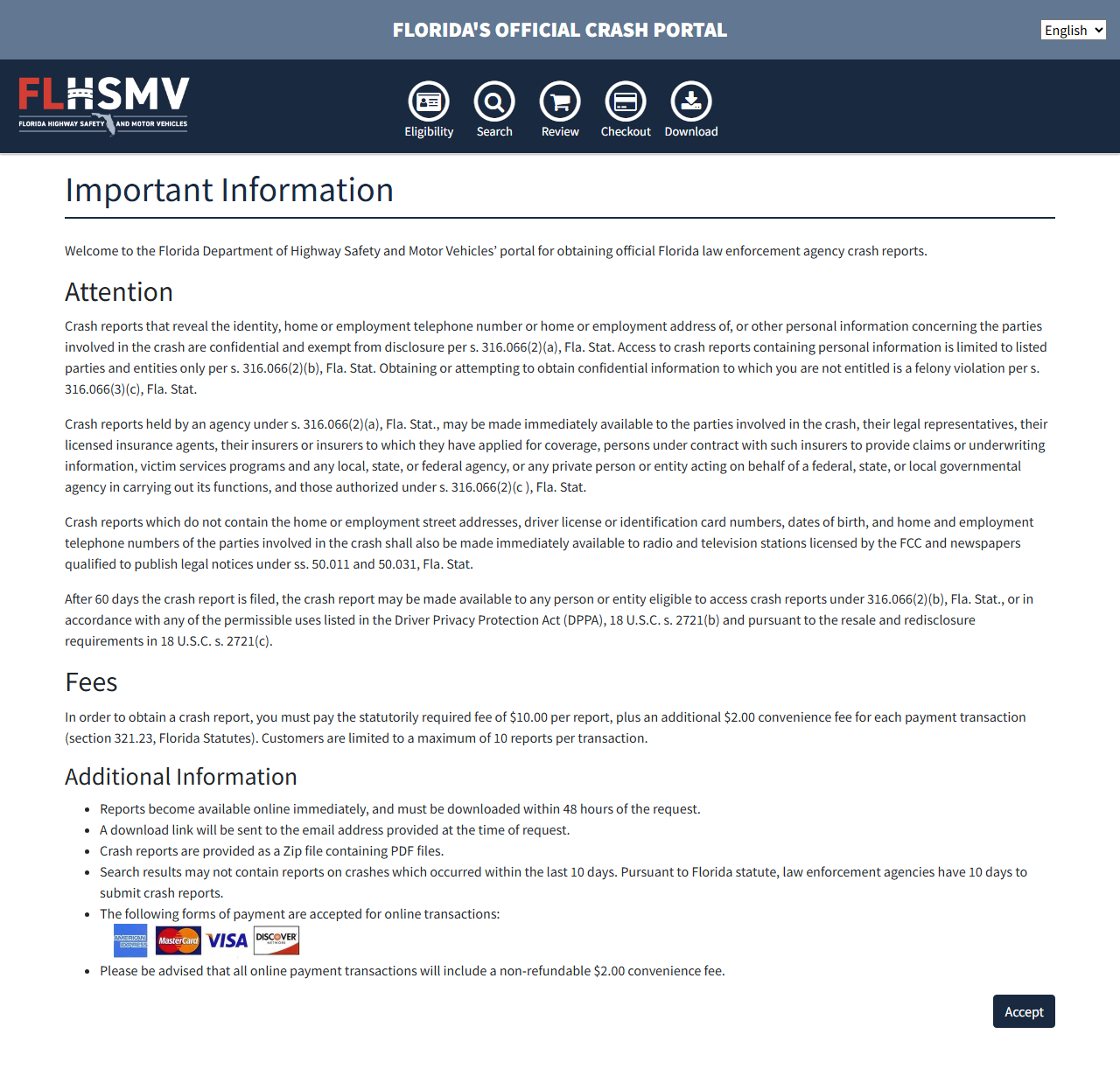
Go to services.flhsmv.gov/CrashReportPurchasing. You’ll see the Important Information page with the fees.
Review the information, then click the “Accept” button at the bottom-right of the page.
Click to enlarge
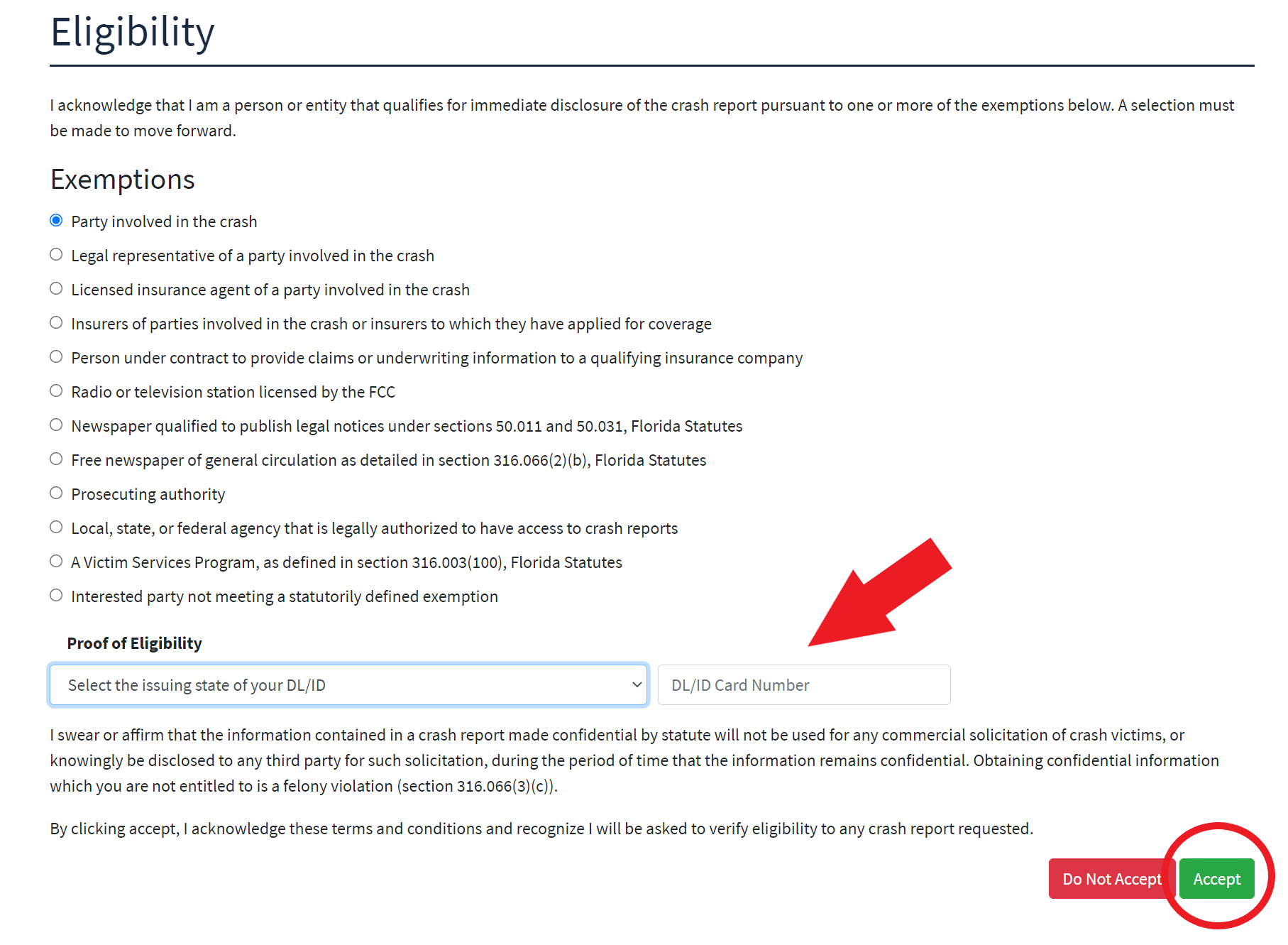
On the Eligibility page, select the reason you’re purchasing the crash report:
- “Party involved in a crash” — if you were a driver or passenger
- “Legal representative of a party involved” — if you are the attorney or legal representative of a party involved
Further down, the page lists permitted uses under the federal Driver’s Privacy Protection Act (DPPA). The portal allows only one selection on the whole page, so if you already chose an option above, leave that list alone.
Then enter your driver’s license state and number under Proof of Eligibility, and click “Accept.”
Click to enlarge
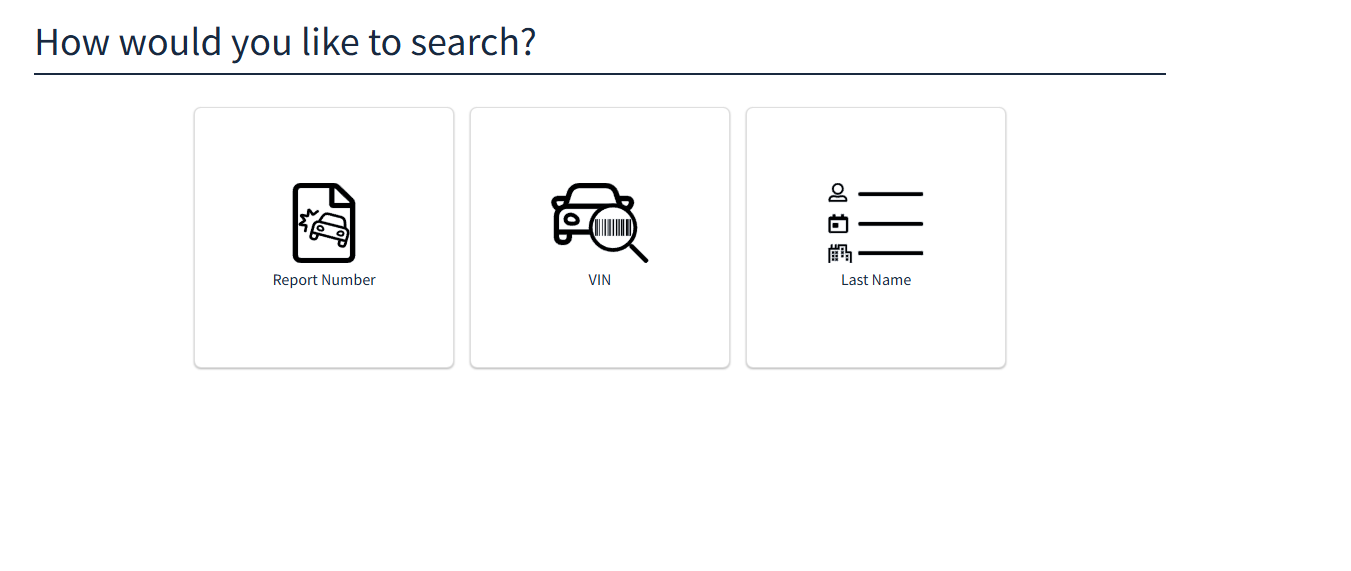
The portal gives you three ways to find your crash report. Choose the one that works best for you — we recommend searching by Last Name as it’s the easiest.
See the tabs below this guide for details on each search method.
Click to enlarge
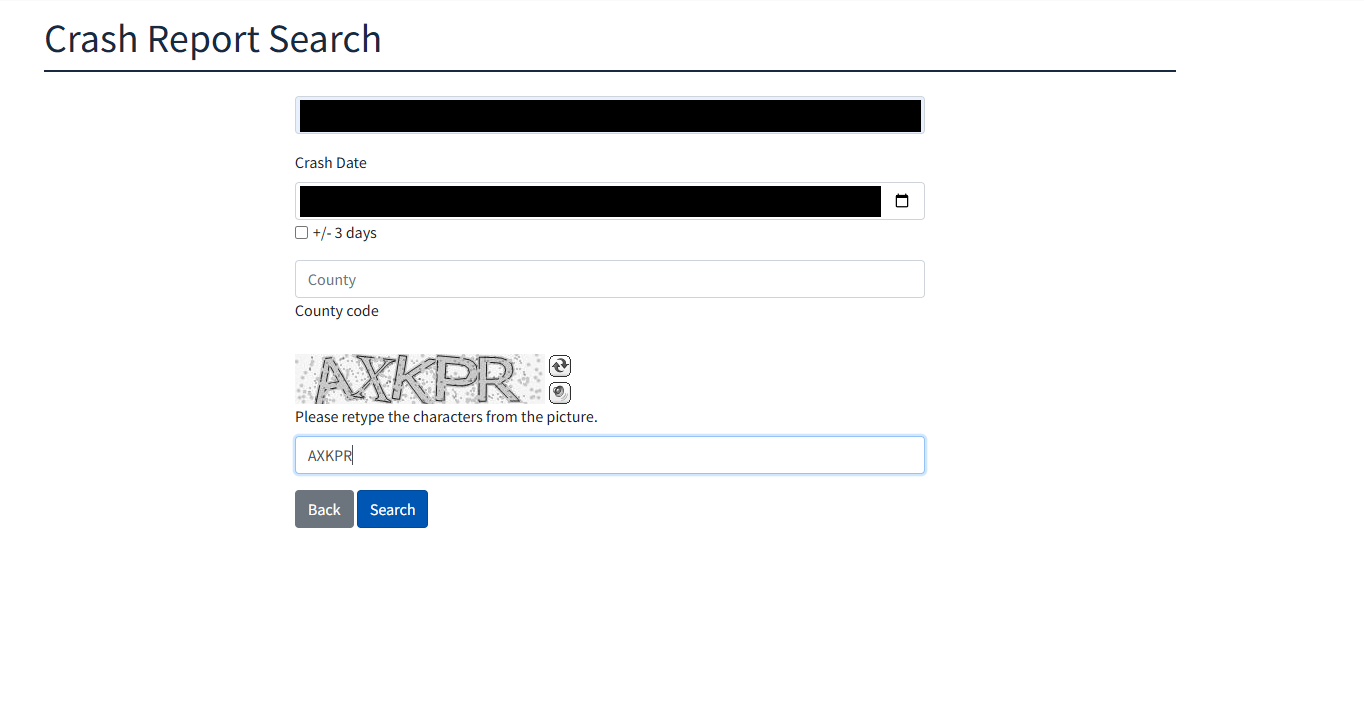
If searching by Last Name: type the last name of a person involved in the accident, select the crash date (if you’re not sure of the exact day, check the +/- 3 days box), and fill in the captcha characters. The County field is optional.
Click “Search” when ready.
Click to enlarge
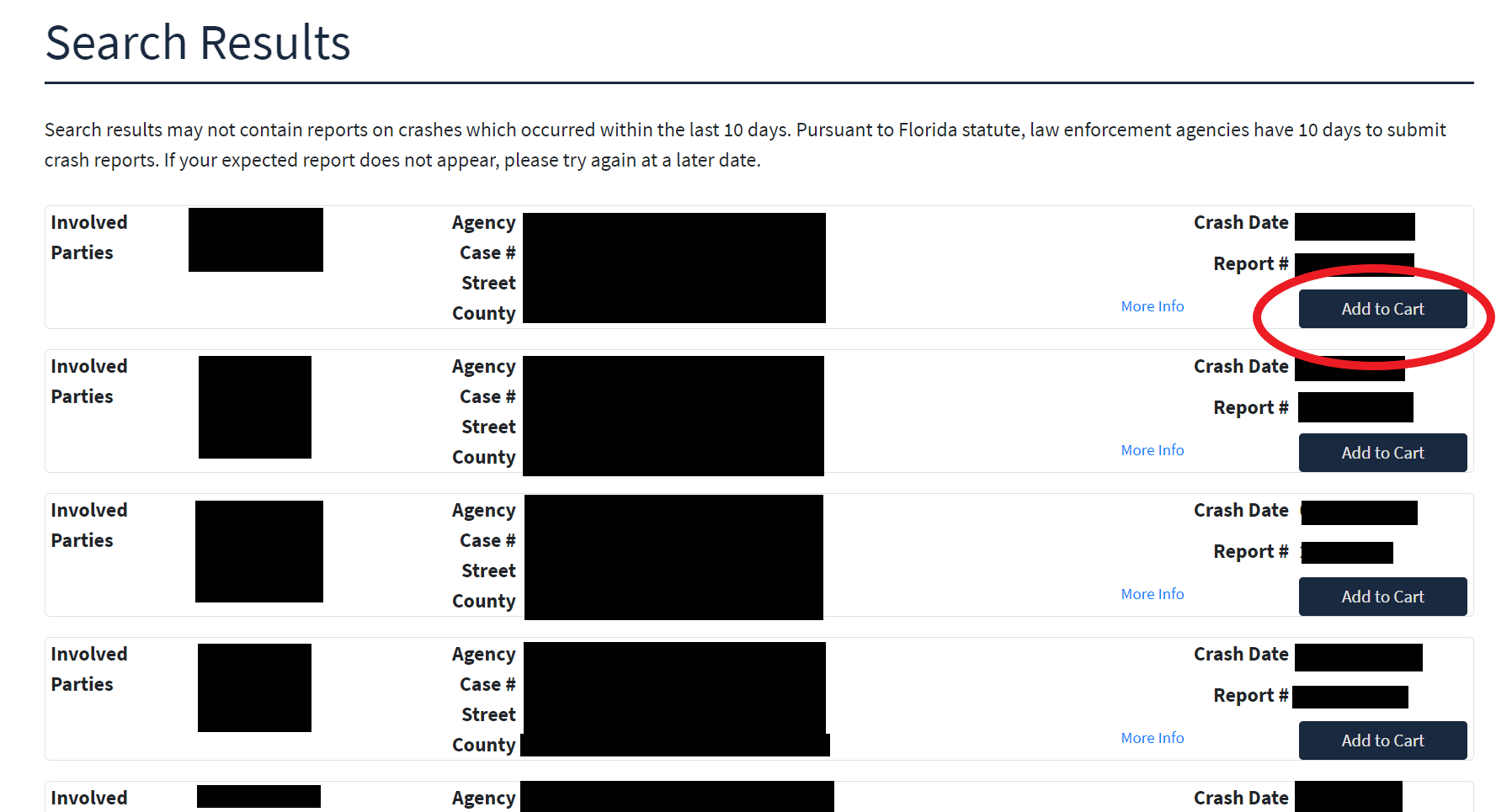
Review the search results. In larger counties like Miami-Dade or Broward, there may be multiple results for common last names. Use the street name where your accident occurred to identify the correct report.
Click “Add to Cart” next to the correct report.
Click to enlarge
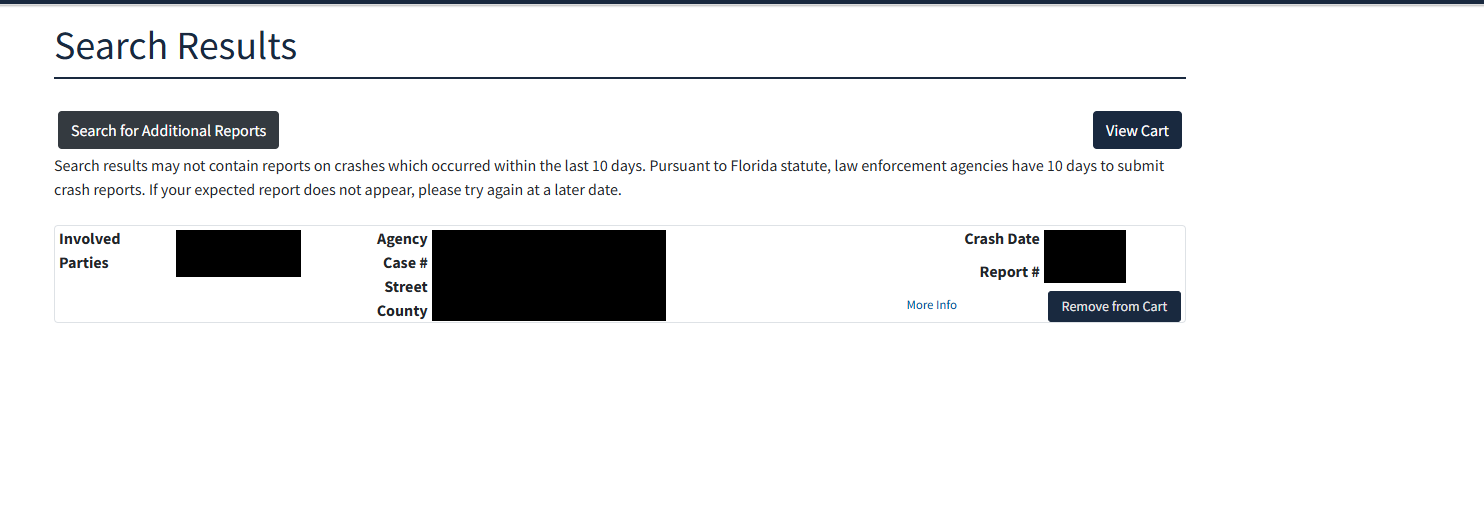
After you add the report, its button changes to “Remove from Cart” and a “View Cart” button appears above the results. Click “View Cart” to proceed to checkout.
Click to enlarge
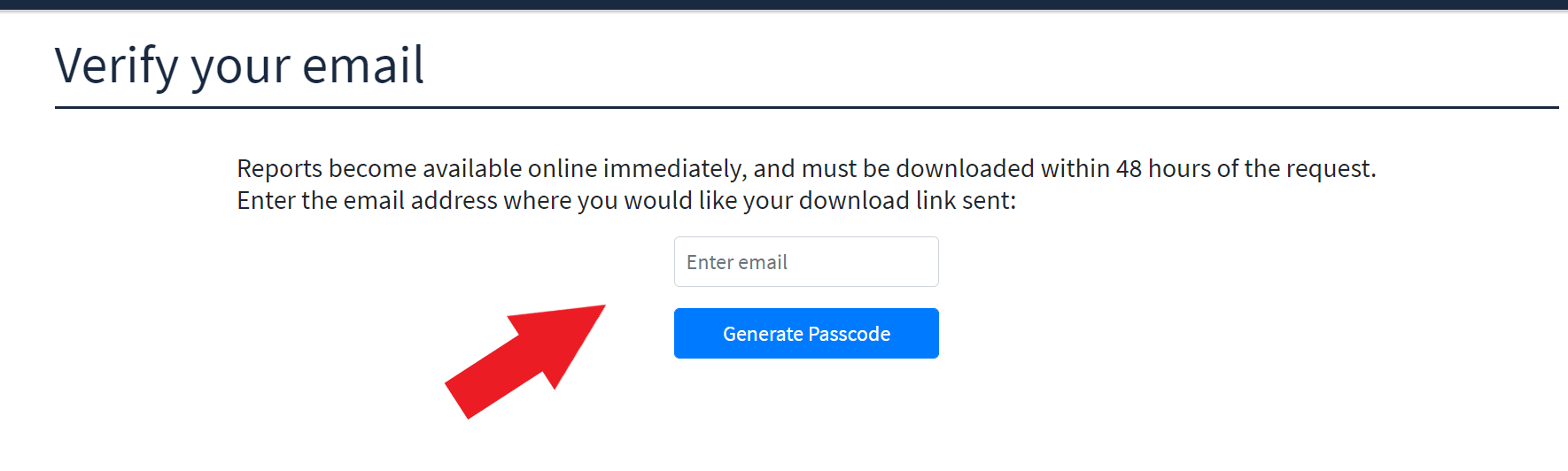
Type the email address where you want the download link sent and click the button to generate a passcode. Check your inbox for an email from FLHSMV with your one-time passcode.
Click to enlarge
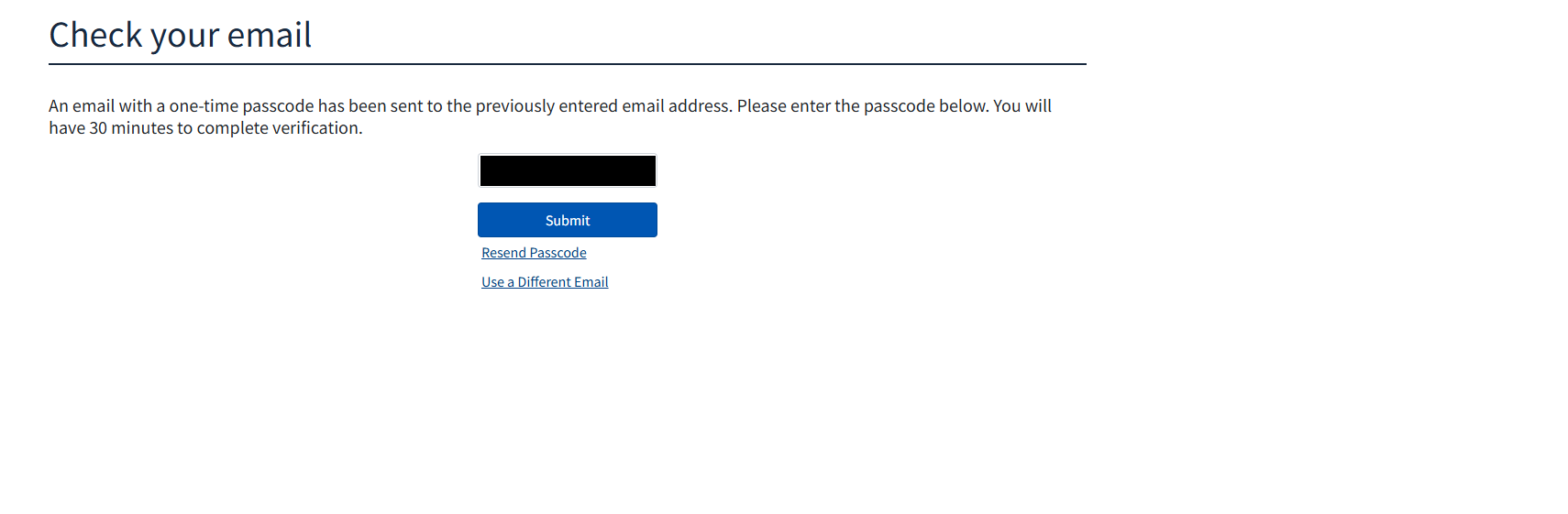
Enter the passcode you received by email and click “Submit”. You have 30 minutes. If the email doesn’t arrive, click “Resend Passcode”.
Click to enlarge
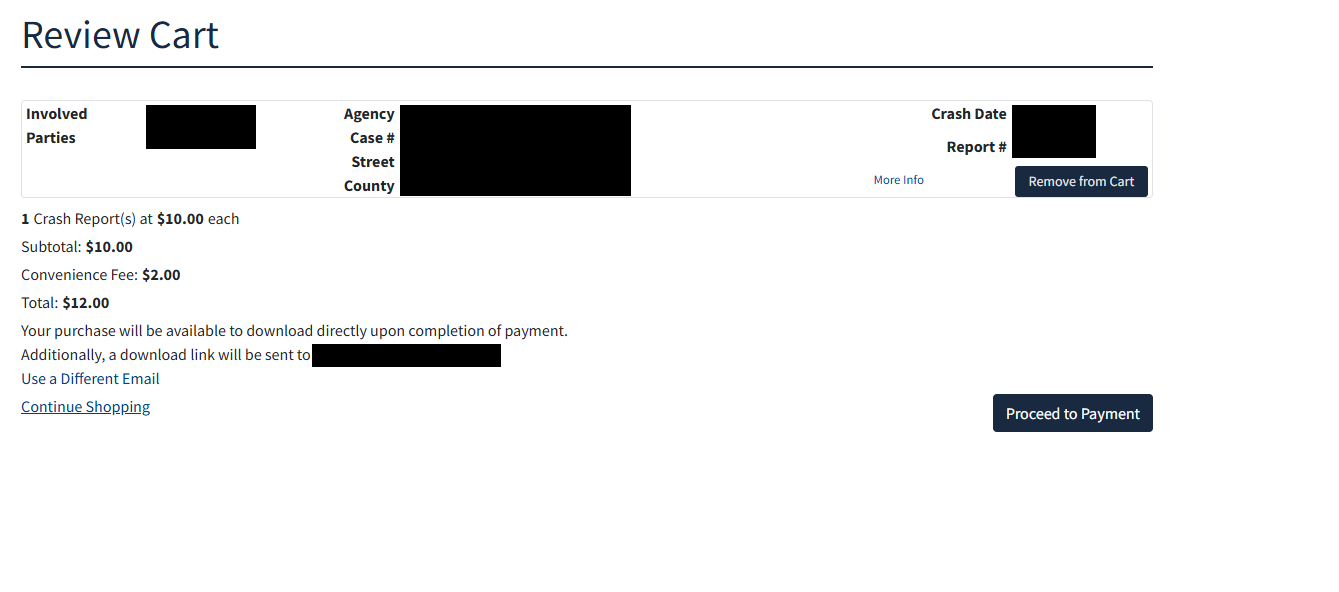
Review the report details to make sure it’s the correct accident. The cart shows the breakdown: $10.00 per report plus the $2.00 convenience fee, $12.00 total for one report. If everything looks right, click “Proceed to Payment”.
Click to enlarge
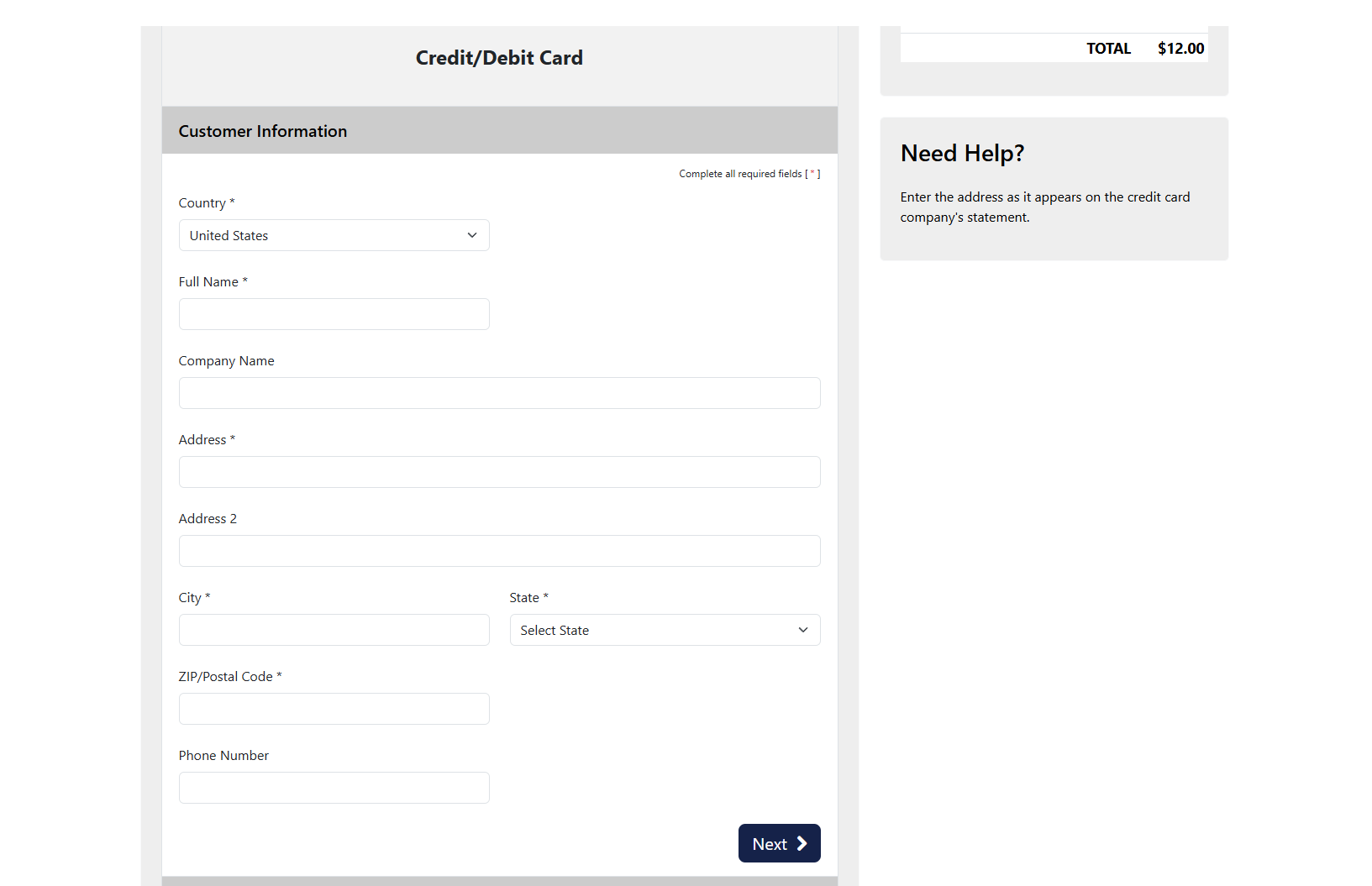
Payment takes two short forms. First fill in Customer Information (country, full name, address, city, state, and ZIP code) and click “Next”.
Click to enlarge
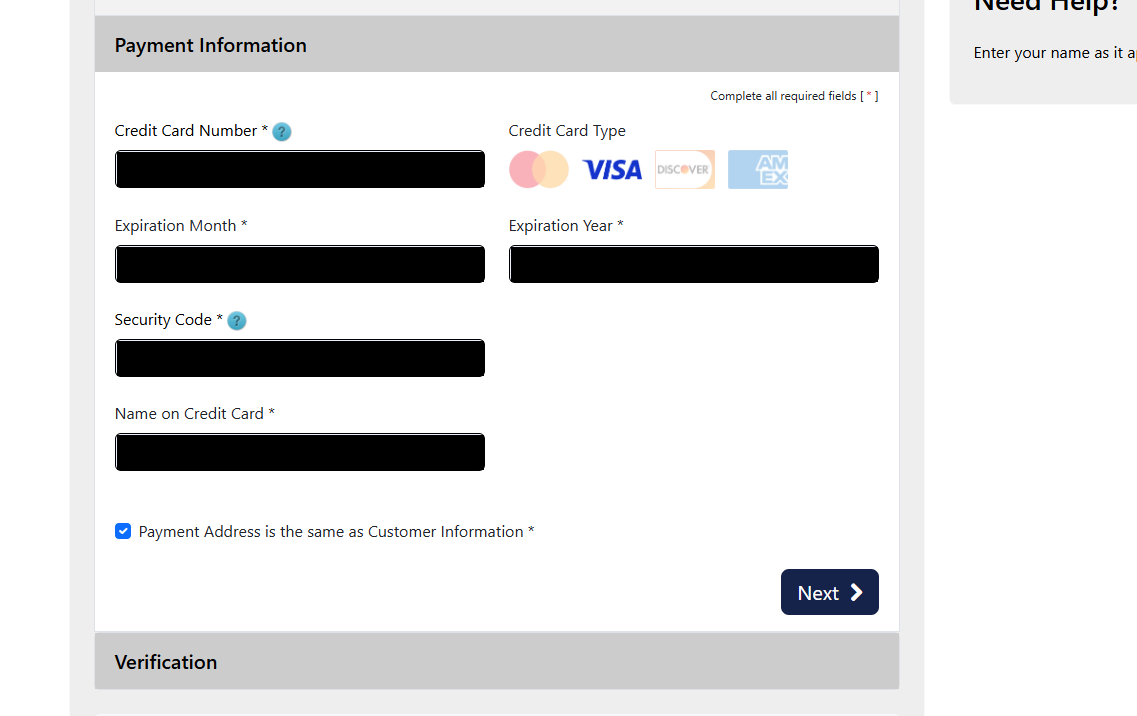
Then fill in Payment Information (card number, expiration month and year, security code, and the name on the card) and click “Next”.
Click to enlarge
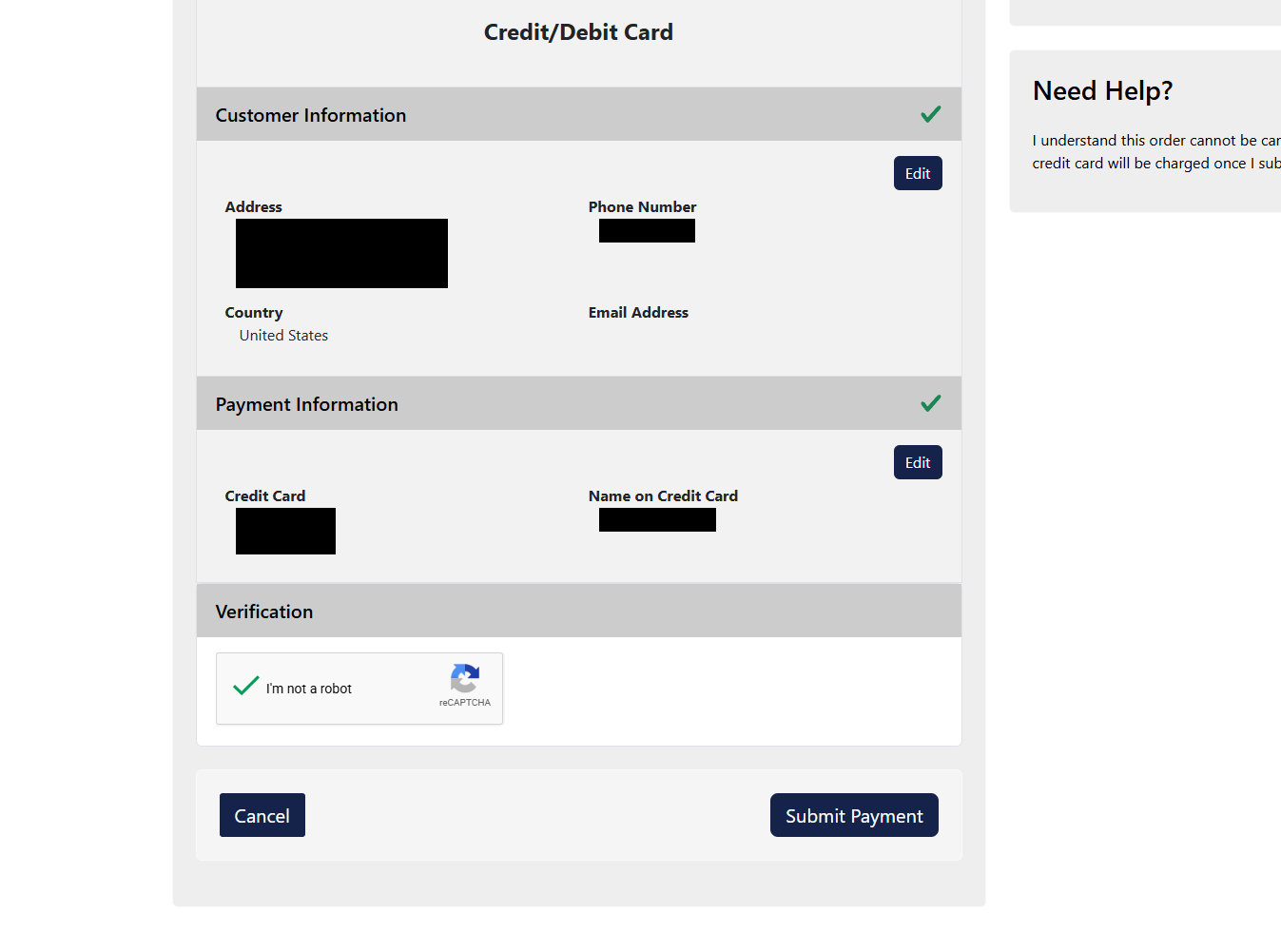
The Verification section then shows a summary of both forms, with an Edit button for each. Check the “I’m not a robot” box and click “Submit Payment”.
Click to enlarge
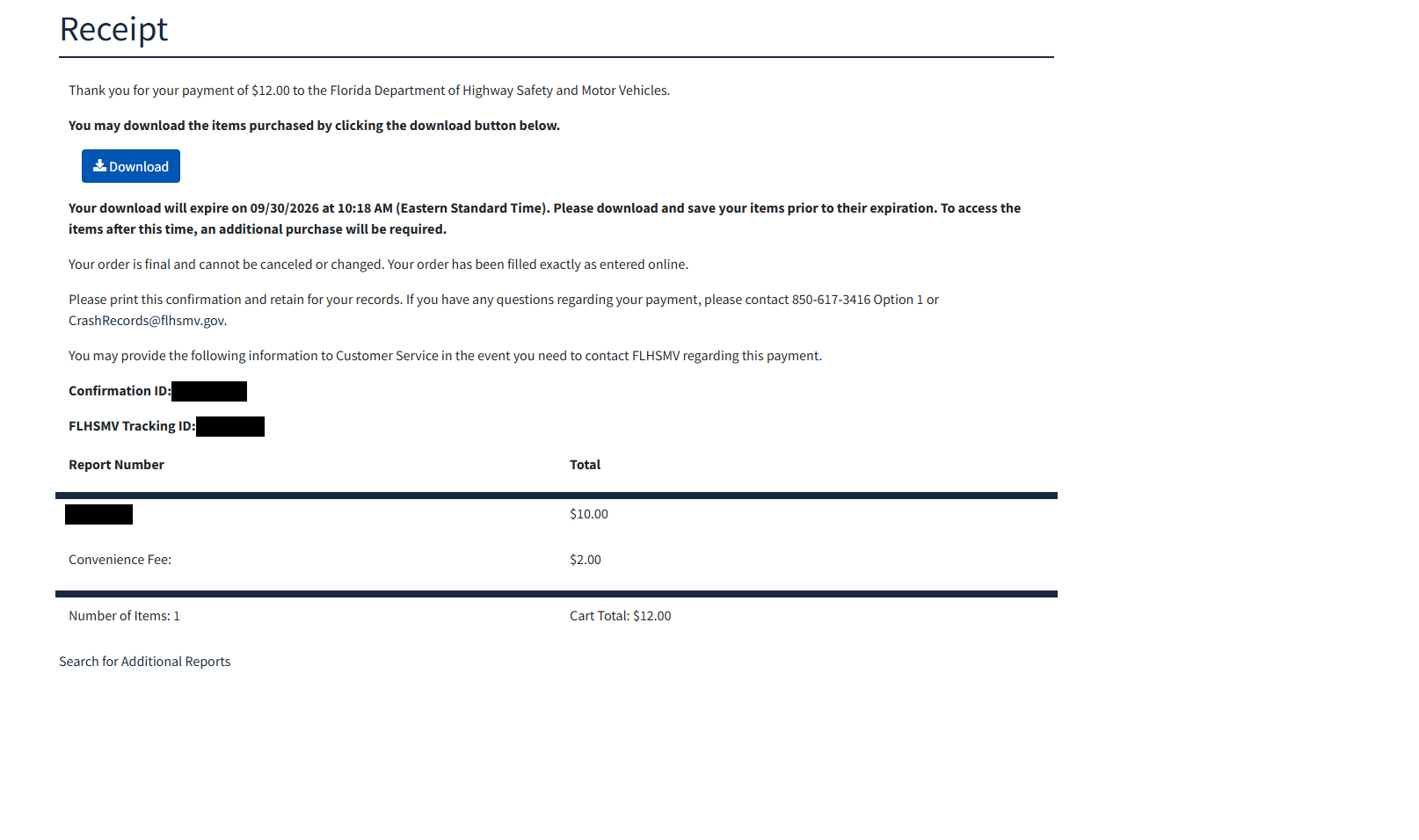
Once payment is processed, click “Download” to save your crash report. The report will download as a PDF file inside a ZIP folder.
A download link will also be emailed to you. You have 48 hours to download the report. After that, you would have to buy it again.
Click to enlarge
Search Method Details
The Florida Crash Portal lets you search for your report using any of these three methods:
Search by Last Name (Recommended)
Enter the last name of any driver or vehicle owner involved in the crash. You’ll also need to provide the crash date and complete a captcha. If you don’t remember the exact day, the +/- 3 days box widens the search.
The County field is optional but can help narrow results if the last name is common.
Search by VIN Number
Enter the Vehicle Identification Number (VIN) of any vehicle involved in the crash. You can find the VIN on your vehicle registration, insurance card, or on a metal plate at the base of the windshield on the driver’s side.
Search by Report Number
If the responding police officer gave you a report number, you can enter it directly. It is not the same as the police agency’s case number. This is the fastest search method since it returns an exact match.
How to Read Your Florida Crash Report
Once you have your crash report, here’s what each section means and where to find the information that matters most.
The top of the first page contains the basic identifying information for the crash:
- HSMV Crash Report Number — The unique state-assigned number. Use this to reference or look up the report later.
- Reporting Agency Case Number — The local police or sheriff’s internal case number. Use this if you need to contact the responding agency.
- Crash Date & Time — When the accident occurred. Verify this matches your recollection.
- County/City of Crash — The jurisdiction where the accident happened. The county where a crash happened is one place a lawsuit can be filed. In general, Florida law also allows filing where a defendant lives.
- Long Form vs. Short Form — A “Long Form” is required when the crash caused a death or an injury, or someone complained of pain or discomfort; involved DUI or leaving the scene; left a vehicle unable to be driven so that a tow truck had to remove it; or involved a commercial vehicle. For other crashes on public roads, the officer must complete a “Short Form” or provide a Driver Exchange of Information for the drivers and passengers to fill out. A driver self-report is a different document: when a crash caused only damage to vehicles or other property and no police report is required, the driver must send one to FLHSMV within 10 days.
This section describes the conditions at the time of the crash. Insurance adjusters and attorneys review this closely because road and weather conditions can affect fault determinations:
- Roadway Surface Condition — Whether the road was dry, wet, icy, or had debris. Each condition has a number code on the form (for example, 1 = Dry, 2 = Wet).
- Weather Condition — Clear, cloudy, rain, fog, etc. Poor weather doesn’t excuse negligent driving, but it provides context.
- Light Condition — Daylight, dusk, dawn, or dark (with or without street lighting). Important in visibility-related crashes.
- Type of Intersection — Whether the crash occurred at a four-way intersection, T-intersection, roundabout, or non-intersection. This helps establish right-of-way.
- Manner of Collision — How the vehicles made contact: front-to-rear (rear-end), angle, sideswipe, head-on, etc. In a “Front to Rear” collision, for example, Florida law starts from a presumption that the rear driver was careless, but that presumption can be overcome with evidence.
Each vehicle involved in the crash gets its own section. Here you’ll find:
- Vehicle Number (1, 2, etc.) — The officer assigns each vehicle a number. These numbers correspond to the crash diagram, so “Vehicle 1” in the narrative is the same as “V1” on the diagram.
- Driver Name, Address, DOB, and DL Number — Identifying information for each driver. Check for accuracy — misspellings are common and can cause problems later.
- Insurance Information — The policy number and insurance company for each vehicle. This is the information you’ll need to file a claim.
- Vehicle Year, Make, Model, VIN — Identifies the specific vehicle. Useful for confirming correct vehicles are listed.
- Vehicle Damage Area — A coded diagram showing where on the vehicle the damage occurred (front, rear, left side, etc.).
- Contributing Cause (Driver) — The officer’s assessment of what each driver did wrong, if anything. Common codes include “Failed to yield right-of-way,” “Careless driving,” “Followed too closely,” and “No improper action.” This is one of the most important fields for determining fault.
Every person involved — drivers, passengers, pedestrians, and cyclists — is listed with:
- Injury Severity — Classified using the codes on the Florida crash report form:
- 1 – None — No injury
- 2 – Possible — Complaint of pain but no visible injury
- 3 – Non-Incapacitating — Visible injury (bruises, cuts) but person can still function
- 4 – Incapacitating — Serious injury preventing normal activity (broken bones, etc.)
- 5 – Fatal (within 30 days) — Death resulted from the crash within 30 days
- 6 – Non-Traffic Fatality — A death recorded on the report that was not caused by the crash
- Seating Position — Where the person was seated in the vehicle. This can be relevant for injury claims.
- Safety Equipment — Whether the person was wearing a seatbelt, using a child seat, or wearing a helmet. Florida’s seatbelt laws can affect comparative fault in some cases.
- Transported By — Whether the person was taken to a hospital by ambulance, helicopter, or private vehicle, and which hospital. This documents the immediate medical response.
The crash diagram is a hand-drawn or computer-generated illustration by the investigating officer showing:
- Road layout — The shape of the roadway, lanes, intersections, and traffic controls (stop signs, signals)
- Vehicle positions — Where each vehicle was before, during, and after the impact, labeled as V1, V2, etc.
- Direction of travel — Arrows showing which way each vehicle was moving
- Point of impact — Usually marked with an “X” or “POI”
- Final rest positions — Where the vehicles ended up after the collision
- North arrow — Compass orientation to help you understand the layout
The narrative is the officer’s written summary of how the crash occurred. This is often the most important section of the entire report because it tells the story in plain language. Look for:
- Sequence of events — What happened first, second, and so on. The officer will describe each vehicle’s actions leading up to the collision.
- Fault language — Phrases like “Vehicle 1 failed to yield” or “Driver 2 was traveling at a high rate of speed” indicate who the officer believes caused the crash.
- Statements from drivers — The officer may quote what each driver said at the scene. Anything you told the officer may be documented here. Under Florida law, statements a driver gives the officer to complete the crash report generally cannot be used as evidence at trial, though there are exceptions.
- Witness accounts — Summaries of what witnesses observed, which can corroborate or contradict the drivers’ statements.
If any driver was issued a traffic citation (ticket) at the scene, it will be documented in the report. This section shows:
- Florida Statute violated — The specific law the driver is accused of breaking (e.g., 316.0895 for following too closely, 316.123 for failure to yield)
- Which driver was cited — Corresponds to the vehicle numbers (V1, V2)
- Charge description — A plain-language description of the violation
A citation is not proof of fault. Florida law generally keeps traffic tickets out of evidence at trial, although insurance adjusters do take them into account. And the absence of a citation doesn’t mean a driver wasn’t at fault; officers sometimes choose not to issue tickets even when a violation occurred.
The report lists the names, addresses, and phone numbers of any witnesses the officer spoke with at the scene. This information is valuable because:
- Independent witnesses who saw the crash can support your version of events
- Witness contact information may be difficult or impossible to obtain later if not documented in the report
- Your attorney can interview witnesses to build a stronger case
Frequently Asked Questions
Call your auto insurance company and ask them to send you a copy of the report. Insurers usually get the crash report when they handle a claim, so the adjuster may be able to email or mail you a copy. They are not required to, and there is no guarantee. You can also request a copy by mail from FLHSMV or in person at the Florida Highway Patrol station nearest the crash; the state fee still applies, and mail requests take four to six weeks. The police department or sheriff’s office that handled the crash may also keep a copy.
In most cases, you do not need a copy of the accident report. If you were involved in an accident in Florida, the reporting police officer should have provided all parties with a printed Driver Exchange of Information. That document contains everything you need to file insurance claims, including:
- Date and time of accident
- Location of accident
- Names and addresses of drivers involved
- Names and addresses of the vehicle owners
- Insurance policy numbers for the vehicles involved
However, the accident report is useful when it’s unclear how the accident occurred. The report includes additional details such as:
- A description of how the accident occurred
- A diagram depicting how the accident occurred
- Names, addresses, and phone numbers of the witnesses the officer identified
- Descriptions of any traffic citations or “tickets” issued
No. If you hire a car accident lawyer to represent you for injuries sustained in an accident, your lawyer will purchase a copy of the report as soon as it is uploaded onto the Florida Crash Portal. If you would like a copy, your attorney should provide you with one.
Under Section 316.066, Florida Statutes, law enforcement officers are required to submit a “Long Form” crash report within 10 days after the investigation is completed. FLHSMV says reports can take up to 10 days to become available, and more complex crashes (multiple vehicles, serious injuries, fatalities) can take longer to investigate before the 10-day submission window even begins.
If your crash just occurred and you can’t find the report, check back daily — it will be uploaded once the officer completes the investigation and submits it. Don’t assume it’s missing after just a day or two.
In some cases, it can take longer than 10 days. If the report still hasn’t appeared after 10 days, call the Records Division of the specific agency that responded to your accident — whether that’s the local Police Department, County Sheriff’s Office, or Florida Highway Patrol. They can tell you if the report is still being processed or if there’s a data entry issue (such as a misspelled name) preventing it from showing up in your search results.
Were You Injured in a Florida Car Accident?
If you were injured in a crash and are weighing your options, we will be happy to obtain a copy of the crash report for you at no cost as part of your free consultation. If the report is already available, we will send you a copy during the consultation by email or text message if you prefer, explain what it means for you, and advise you on your options.
